
The letter from the council arrives, the inspection date is set, and someone spends the next two evenings printing booking sheets, hunting for vaccination dates and writing out a register by hand. The records were all in KennelBooker already. They just weren't in the shape an inspector wants to see. The licence inspection pack fixes that. You pick your licence and a date range, and KennelBooker builds one printable PDF of the records an animal activity licence inspector asks for.
What goes in the pack
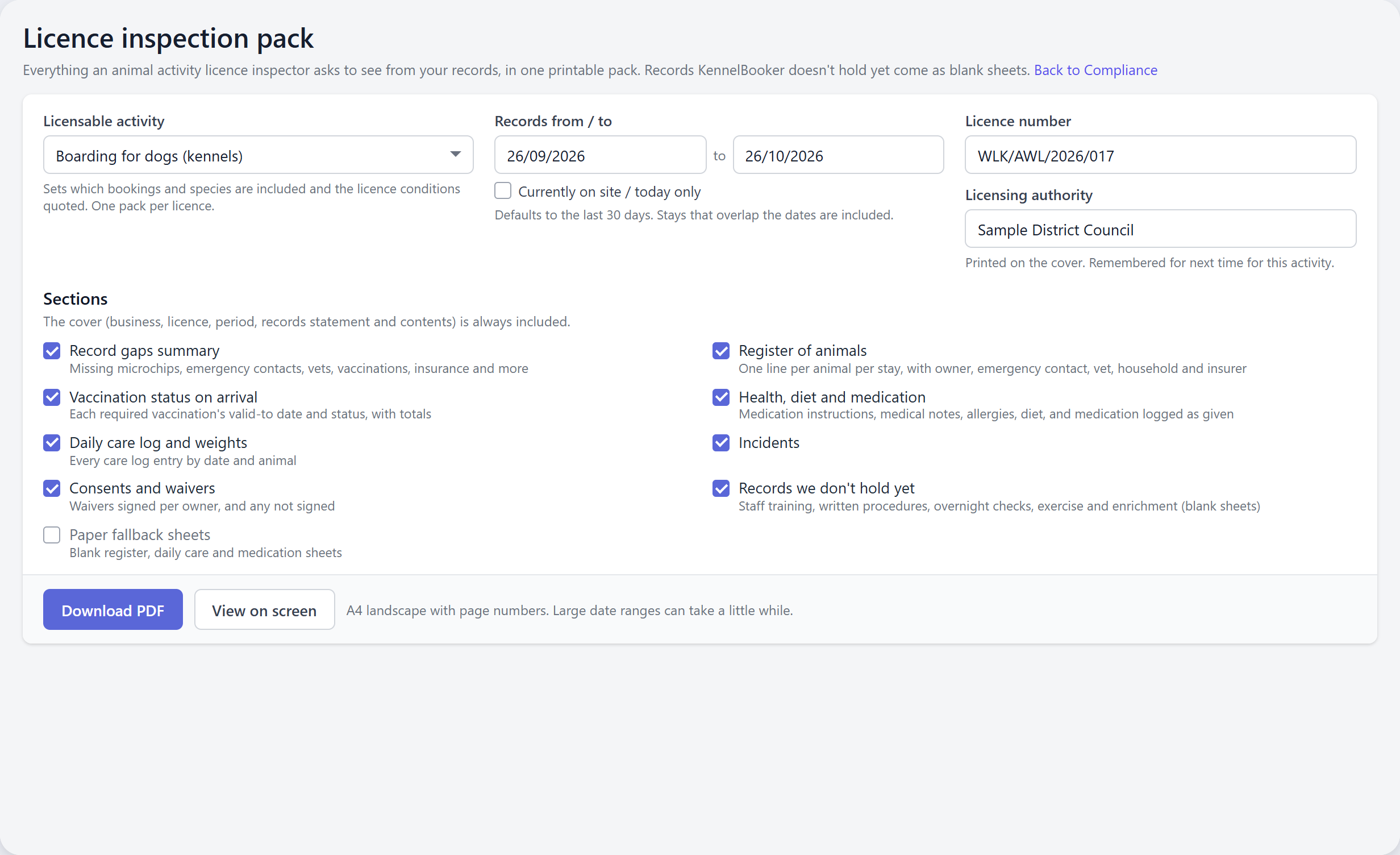
The pack is built fresh from your bookings each time you make it, so it is always up to date. It opens with a cover page showing your business, licence number, licensing authority, the activity, the period covered and a short statement of how your records are kept, with a contents list. You then choose which sections to include:
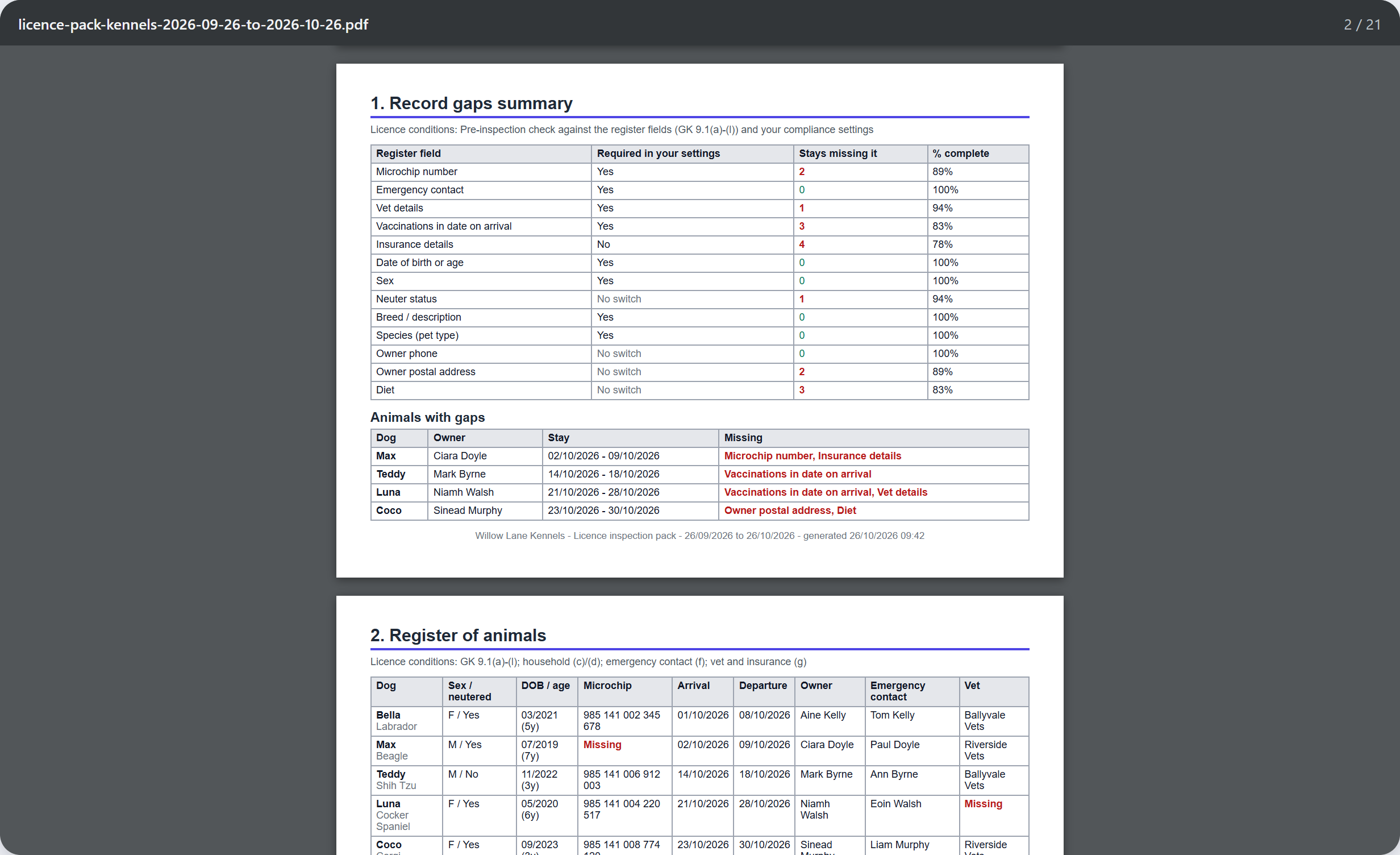
- Record gaps summary. Every stay checked for a missing microchip, emergency contact, vet, in-date vaccinations, insurance, date of birth, sex, neuter status, breed, owner phone and address, and diet. Each field shows how many stays are missing it, and a list names each animal with a gap.
- Register of animals. One line per animal per stay, with arrival and departure, owner, emergency contact, vet, microchip, insurer, and other animals from the same household staying at the same time.
- Vaccination status on arrival. Each required vaccination's valid-to date and whether it was in date, expiring during the stay, expired or missing when the animal arrived, and whether a certificate is on file.
- Health, diet and medication. Medication instructions, medical notes, allergies, diet and behaviour, plus medication logged as given.
- Daily care log and weights. Every care log entry by date and animal, with the time and the member of staff, and any weights recorded.
- Incidents and consents and waivers, including any waivers an owner hasn't signed yet.
- Records we don't hold yet. Staff training, written procedures and exercise and enrichment come as sheets for your own records. The overnight checks log uses the Night round from the Daily Care Log.
- Paper fallback sheets. A blank register, daily care sheet and medication log for days the system can't be used.
How to make a pack
- Open Regulatory Compliance from the menu and click Inspection pack.
- Choose the Licensable activity: boarding for dogs, boarding for cats, day care for dogs or home boarding for dogs.
- Set Records from / to. It starts at the last 30 days. Any stay that overlaps the dates is included. Tick Currently on site / today only if the inspector has turned up unannounced and wants to see who is in today.
- Type your Licence number and Licensing authority. They are printed on the cover and remembered for next time.
- Untick any sections you don't need, then click Download PDF for a file to print or email, or View on screen to open it in a new tab with a Print button.
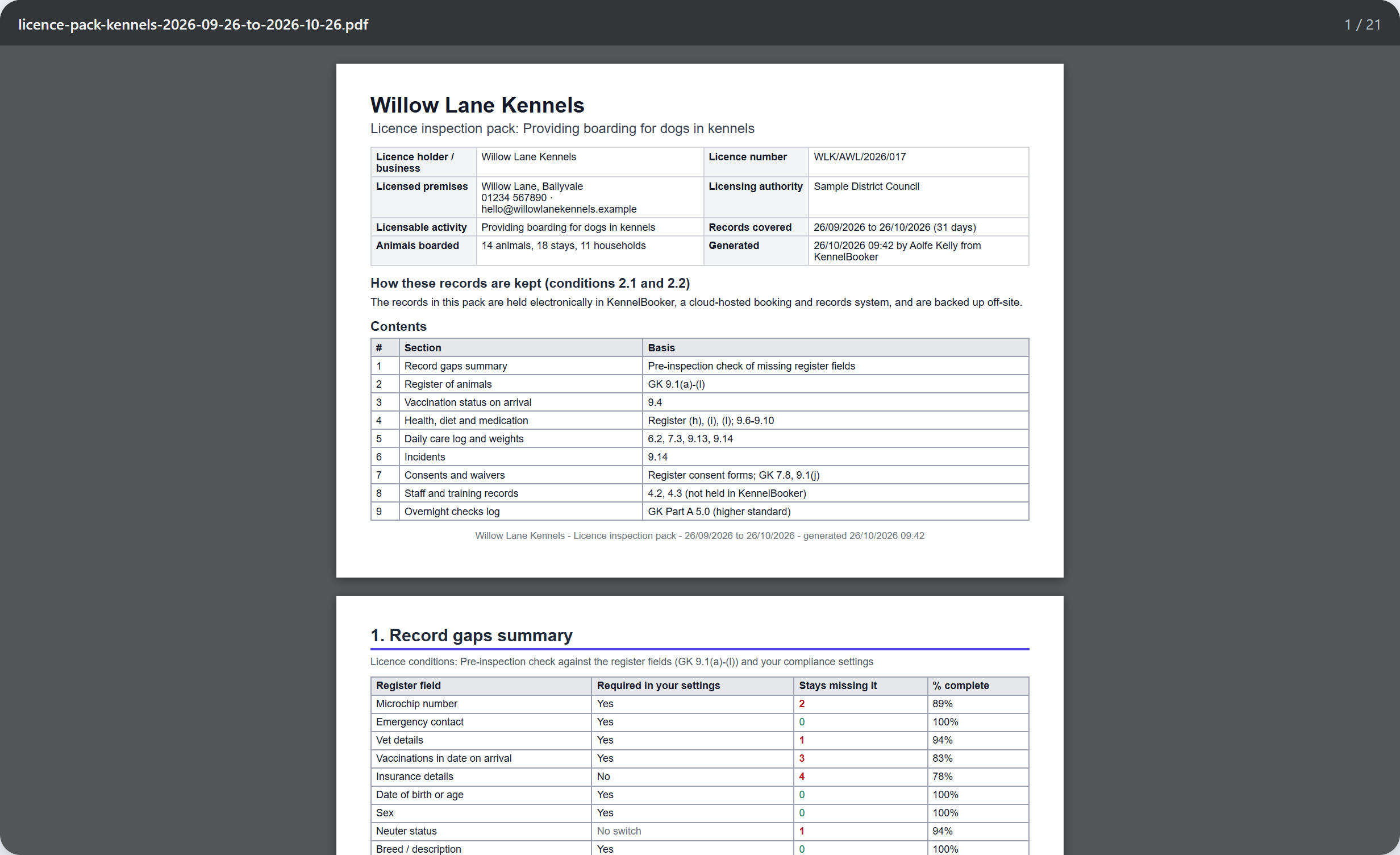
The PDF prints on A4 turned sideways, with page numbers, and long tables repeat their headings on every page. A month of records usually takes a few seconds. A busy day care over a long range takes a little longer.
Find the gaps before the inspector does
The section we expect owners to use most is the one the inspector never sees. The record gaps summary runs down every stay in the period and counts what's missing. If two dogs came in without a microchip number on file, or a dog arrived with its kennel cough vaccination already out of date, it's listed by name with the owner and the dates of the stay.
It also shows whether each field is switched on under Settings, Compliance for the services in the pack. That tells you whether the gap is a missed booking or a setting you haven't turned on. Make the pack a few weeks before the visit, fix what it lists, then make it again. You can leave the gaps page out of the copy you hand over.
Why we built it
In England, kennels, catteries, day care and home boarders are licensed under the Animal Welfare (Licensing of Activities Involving Animals) Regulations 2018. The licence conditions ask you to keep a register of every animal, records of health, medication, feeding and incidents, and to keep them for three years in a form an inspector can read at any visit, announced or not. Your star rating depends partly on how well those records are kept.
We read through the DEFRA guidance and the pre-inspection checklists from more than a dozen councils to see what inspectors actually ask for. Each section of the pack quotes the licence conditions it answers, so the inspector can see what it's for. Some things inspectors ask for, like staff training records and written procedures, aren't stored in KennelBooker yet. Rather than leave them out, the pack includes a sheet for each so nothing is missing from the bundle.
The pack is built around England's guidance, but the register, vaccination and care records are the same records councils in Scotland, Wales and Northern Ireland ask about, so it is useful wherever you're licensed.
Who can make one
The pack holds every customer's contact details, so it isn't open to every login. The account owner can always make one. Staff need admin access or one of these permissions on their staff login: Settings, Financial reports, or Daily operational reports. Anyone else sees a No Access page.
Available now on every KennelBooker plan. Find it under Regulatory Compliance, then Inspection pack.
Frequently asked questions
What records does a council inspector want to see at a dog kennel?
Under England's animal activity licensing rules, inspectors ask for the register of animals (owner, emergency contact, vet, microchip, vaccinations and dates of stay), health and medication records, daily care records, incidents and consent forms. The licence inspection pack in KennelBooker prints all of these from your bookings, plus blank sheets for records KennelBooker doesn't hold, such as staff training.
Where do I find the licence inspection pack in KennelBooker?
Open Regulatory Compliance from the menu and click Inspection pack in the top right of the page. Pick the activity, the dates and the sections, then click Download PDF or View on screen.
Does the pack work for catteries, day care and home boarding?
Yes. Choose Boarding for dogs (kennels), Boarding for cats (cattery), Day care for dogs or Home boarding for dogs. Each one includes the right bookings and animals and quotes that activity's licence conditions. Generate one pack per licence.
How far back can the pack go?
Up to a year at a time. For a longer look-back, such as the three years of records the licence conditions ask you to keep, generate one pack per year.